多模态Agent:文本-图片-音频-视频
应用场景中核心困难
多模态数据之间有显著的异构性。
如何文本找图/生图?
如何图生文本,来理解图片?
音频和视频也有以上的问题。
解决方案
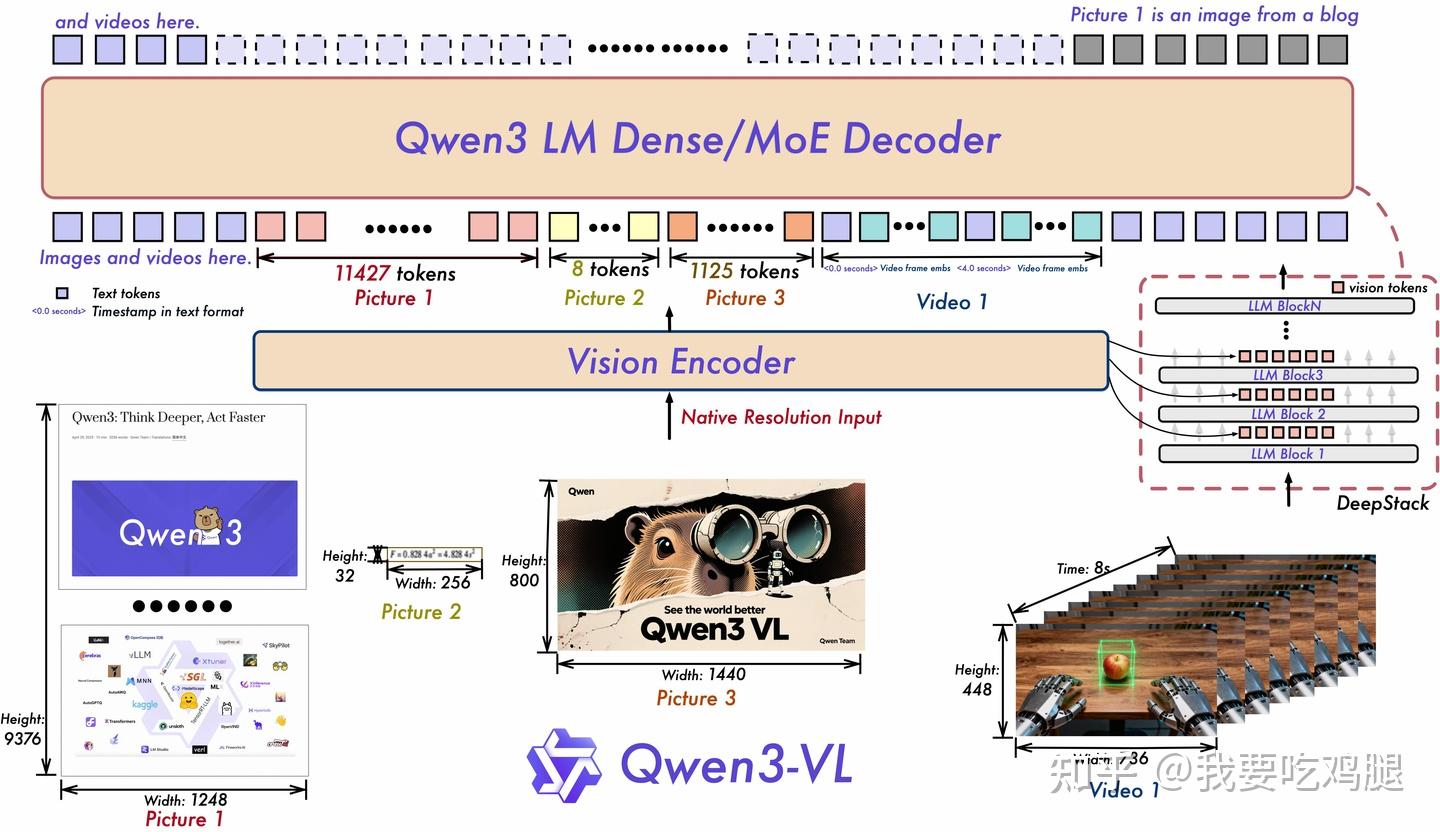
多模态大模型:预训练阶段就融合了大量的多模态数据,能够处理和理解多种不同类型数据输入的人工智能模型,例如文本、图像、音频和视频。例如:CLIP,Qwen-VL,Deepseek-OCR,TTS,Seedance等。
文<-->图 场景举例
pdf中有图片,在做知识库的时候,怎么检索的时候也把图片检索出来?
大概有两个方向的思路
多模态embedding模型,将不同类型的数据处理成统一的向量,使得不同模态的数据可以在同一向量空间中进行对齐和处理,从而支持跨模态检索、生成和分析等任务。
分开处理,不同类型数据用对应的embedding模型,检索时候分开检索。
第二种方向--实践--通过文本查找电商图片
数据准备:通过CLIP模型,批量处理电商图片,把向量数据和图片路径存入向量数据库
检索查询:通过CLIP模型,处理输入的文本信息为向量,通过与向量库进行余弦相似度匹配,找到top_k的图片
代码片段:
"""
CLIP图像搜索系统主程序
整合所有模块,提供完整的图像索引和搜索功能
"""

import time
from typing import List, Optional, Dict, Any
from config import config
from logger_config import get_logger, log_execution_time
from clip_encoder import CLIPEncoder
from milvus_manager import MilvusManager
from image_processor import ImageProcessor


class CLIPImageSearchSystem:
    """CLIP图像搜索系统

    整合CLIP编码器、Milvus数据库和图像处理器,提供完整的图像搜索功能
    """

    def __init__(self, log_level: str = "INFO"):
        """初始化搜索系统

        Args:
            log_level: 日志级别
        """
        # 设置日志
        self.logger = get_logger("CLIPImageSearchSystem", log_level)
        self.logger.info("初始化CLIP图像搜索系统")

        # 初始化各个组件
        self.encoder = None
        self.db_manager = None
        self.image_processor = None

        self._initialize_components()

    def _initialize_components(self) -> None:
        """初始化系统组件"""
        try:
            # 验证配置
            config.validate()
            self.logger.info("配置验证通过")

            # 初始化CLIP编码器
            self.logger.info("初始化CLIP编码器...")
            self.encoder = CLIPEncoder()

            # 初始化Milvus管理器
            self.logger.info("初始化Milvus数据库管理器...")
            self.db_manager = MilvusManager()

            # 初始化图像处理器
            self.logger.info("初始化图像处理器...")
            self.image_processor = ImageProcessor()

            self.logger.info("所有组件初始化完成")

        except Exception as e:
            self.logger.error(f"组件初始化失败: {e}")
            raise

    @log_execution_time
    def setup_database(self, drop_existing: bool = True) -> bool:
        """设置数据库集合和索引

        Args:
            drop_existing: 是否删除已存在的集合

        Returns:
            设置是否成功
        """
        try:
            self.logger.info("开始设置数据库...")

            # 创建集合
            success = self.db_manager.create_collection(drop_existing=drop_existing)
            if not success:
                self.logger.error("创建集合失败")
                return False

            # 创建索引
            success = self.db_manager.create_index()
            if not success:
                self.logger.error("创建索引失败")
                return False

            self.logger.info("数据库设置完成")
            return True

        except Exception as e:
            self.logger.error(f"数据库设置失败: {e}")
            return False

    @log_execution_time
    def index_images(self, batch_size: int = 32, validate_images: bool = True, skip_existing: bool = True) -> bool:
        """索引图像到数据库

        Args:
            batch_size: 批处理大小
            validate_images: 是否验证图像有效性
            skip_existing: 是否跳过已存在的图像

        Returns:
            索引是否成功
        """
        try:
            self.logger.info("开始索引图像...")

            # 获取图像路径
            image_paths = self.image_processor.get_image_paths()
            if not image_paths:
                self.logger.warning("未找到图像文件")
                return False

            # 验证图像(可选)
            if validate_images:
                self.logger.info("验证图像文件...")
                image_paths = self.image_processor.filter_valid_images(image_paths)

            if not image_paths:
                self.logger.error("没有有效的图像文件")
                return False

            # 检查并过滤已存在的图像
            if skip_existing:
                self.logger.info("检查已存在的图像...")
                existing_status = self.db_manager.batch_check_images_exist(image_paths)

                # 过滤出不存在的图像
                new_image_paths = [path for path, exists in existing_status.items() if not exists]
                existing_count = len(image_paths) - len(new_image_paths)

                if existing_count > 0:
                    self.logger.info(f"跳过 {existing_count} 张已存在的图像")

                if not new_image_paths:
                    self.logger.info("所有图像都已存在,无需重新索引")
                    return True

                image_paths = new_image_paths
                self.logger.info(f"需要索引 {len(image_paths)} 张新图像")

            # 批量编码图像
            self.logger.info(f"开始编码 {len(image_paths)} 张图像...")
            features = self.encoder.encode_images_batch(image_paths, batch_size)

            if len(features) != len(image_paths):
                self.logger.warning(f"编码数量不匹配: {len(features)} vs {len(image_paths)}")
                # 调整路径列表以匹配特征数量
                image_paths = image_paths[:len(features)]

            # 准备数据
            data = self.image_processor.prepare_image_data(image_paths, features)

            # 插入数据库
            self.logger.info("插入数据到Milvus...")
            result = self.db_manager.insert_data(data)

            if result:
                self.logger.info(f"成功索引 {result['insert_count']} 张图像")
                return True
            else:
                self.logger.error("数据插入失败")
                return False

        except Exception as e:
            self.logger.error(f"图像索引失败: {e}")
            return False

    @log_execution_time
    def search_by_text(self,
                      query_text: str,
                      limit: int = None,
                      display_results: bool = True,
                      save_results: str = None) -> Optional[List[List[Dict]]]:
        """根据文本搜索相似图像

        Args:
            query_text: 查询文本
            limit: 返回结果数量限制
            display_results: 是否显示搜索结果
            save_results: 结果保存路径

        Returns:
            搜索结果列表
        """
        try:
            self.logger.info(f"文本搜索: '{query_text}'")

            # 编码查询文本
            query_embedding = self.encoder.encode_text(query_text)

            # 执行搜索
            search_results = self.db_manager.search(
                query_vectors=[query_embedding],
                limit=limit
            )

            if not search_results:
                self.logger.warning("搜索未返回结果")
                return None

            # 显示结果
            if display_results:
                self.image_processor.display_results(
                    search_results,
                    query_text,
                    save_results
                )

            self.logger.info(f"搜索完成,找到 {len(search_results[0])} 个结果")
            return search_results

        except Exception as e:
            self.logger.error(f"文本搜索失败: {e}")
            return None

    @log_execution_time
    def search_by_image(self,
                       image_path: str,
                       limit: int = None,
                       display_results: bool = True,
                       save_results: str = None) -> Optional[List[List[Dict]]]:
        """根据图像搜索相似图像

        Args:
            image_path: 查询图像路径
            limit: 返回结果数量限制
            display_results: 是否显示搜索结果
            save_results: 结果保存路径

        Returns:
            搜索结果列表
        """
        try:
            self.logger.info(f"图像搜索: {image_path}")

            # 编码查询图像
            query_embedding = self.encoder.encode_image(image_path)

            # 执行搜索
            search_results = self.db_manager.search(
                query_vectors=[query_embedding],
                limit=limit
            )

            if not search_results:
                self.logger.warning("搜索未返回结果")
                return None

            # 显示结果
            if display_results:
                query_text = f"相似图像搜索: {image_path}"
                self.image_processor.display_results(
                    search_results,
                    query_text,
                    save_results
                )

            self.logger.info(f"搜索完成,找到 {len(search_results[0])} 个结果")
            return search_results

        except Exception as e:
            self.logger.error(f"图像搜索失败: {e}")
            return None

    def get_system_info(self) -> Dict[str, Any]:
        """获取系统信息

        Returns:
            系统信息字典
        """
        info = {
            "encoder_info": self.encoder.get_model_info() if self.encoder else None,
            "database_collections": self.db_manager.list_collections() if self.db_manager else [],
            "image_directory": self.image_processor.image_directory if self.image_processor else None,
            "config": {
                "clip_model": config.clip.model_name,
                "collection_name": config.milvus.collection_name,
                "feature_dimension": config.clip.feature_dimension
            }
        }

        # 获取集合统计信息
        if self.db_manager:
            stats = self.db_manager.get_collection_stats()
            info["collection_stats"] = stats

        return info

    def cleanup(self) -> None:
        """清理资源"""
        try:
            if self.db_manager:
                self.db_manager.close()
            self.logger.info("系统资源清理完成")
        except Exception as e:
            self.logger.error(f"资源清理失败: {e}")

    def __enter__(self):
        """上下文管理器入口"""
        return self

    def __exit__(self, exc_type, exc_val, exc_tb):
        """上下文管理器出口"""
        self.cleanup()


def main():
    """主函数 - 演示系统使用"""
    # 创建搜索系统
    with CLIPImageSearchSystem(log_level="INFO") as search_system:

        # 设置数据库
        print("设置数据库...")
        if not search_system.setup_database():
            print("数据库设置失败")
            return

        # 索引图像(第一次运行)
        print("索引图像...")
        if not search_system.index_images(batch_size=16, skip_existing=True):
            print("图像索引失败")
            return

        # # 再次索引图像(测试重复检测功能)
        # print("\n再次索引图像(测试重复检测)...")
        # if not search_system.index_images(batch_size=16, skip_existing=True):
        #     print("图像索引失败")
        #     return

        # 文本搜索示例
        print("\n执行文本搜索...")
        query_text = "red goldfish"
        results = search_system.search_by_text(query_text, limit=10)

        if results:
            print(f"搜索 '{query_text}' 完成")

        # 显示系统信息
        print("\n系统信息:")
        info = search_system.get_system_info()
        for key, value in info.items():
            print(f"{key}: {value}")


if __name__ == "__main__":
    main()
本文是原创文章,采用 CC BY-NC-ND 4.0 协议,完整转载请注明来自 故宫而过
阅读建议


评论
匿名评论
隐私政策
你无需删除空行,直接评论以获取最佳展示效果